For parents of high school athletes
Recruiting pages for student athletes.
One link to send college coaches, with everything they look for in one place: highlight video, stats, academics, awards, schedule, and a one-page PDF. We build it, keep it current, and keep your family’s privacy in mind.
Request a page See a sample page
$100 to build. Updates and news tracking are $10/mo or $99/yr, and you can cancel anytime.

What’s included
Everything a college coach looks for, on one page.
Coaches get a lot of emails. A clean page with the essentials up front makes it easy for them to say yes to a closer look.
Bio and key numbers
Name, position, grad year, height and weight, jersey number, school, and a photo, right at the top.
Highlight video
Your Hudl or YouTube highlight reel, embedded so coaches can watch without hunting for it.
Stats by season
A clear table that reads well on a phone, with career totals.
Academics
GPA, test scores if you want them listed, intended major, and the NCAA Eligibility Center ID.
Awards, club teams & camps
Honors, club or travel teams, and camps or ID events attended.
Schedule
Upcoming games and showcases, so coaches know where to see your athlete play.
Coach references
Coaches who have agreed to be contacted, with how to reach them.
In the news
Press mentions with the headline, outlet, date, and a link to the story. We link out, never copy articles.
One-pager PDF & a link to share
A matching recruiting one-pager to attach to emails, and a clean link that shows a preview when shared.
Your colors
Built in your school colors.
Just tell us the school. We look up its official colors and use them by default, then confirm them with you in the preview. Prefer different colors? Just say so. We adjust the shades if needed so every word stays easy to read.

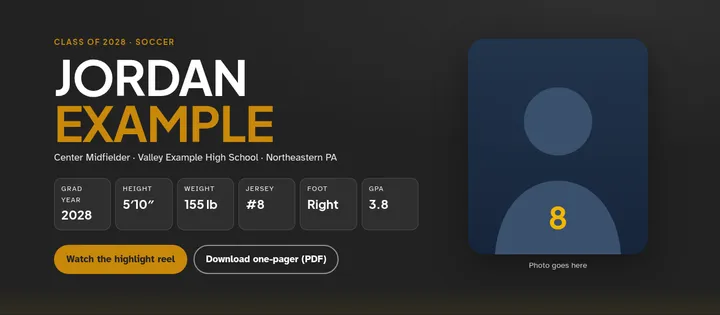
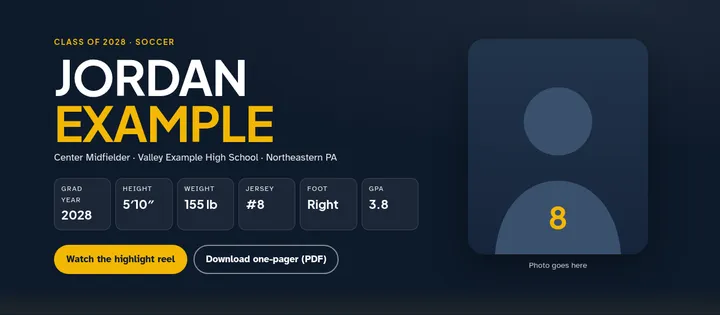
Colors only. Sample page with made-up example data. We use school colors, never logos or mascot artwork, and we’re not affiliated with or endorsed by any school or district. 9 local schools are ready to go, from Dallas and Lake-Lehman to Wilkes-Barre Area. Try the color picker on the sample page
Monthly updates
Kept current all season.
An out-of-date page can hurt more than help. On the update plan, we keep it fresh for you.
- New stats, video, and awards as the season goes. Send them by email and we post them.
- Schedule changes for games, showcases, and camps.
- News tracking: each month we search local news and school sports pages for mentions of your athlete and add them to the page, with a link to each story.
- An updated one-pager PDF whenever the numbers change.
Privacy first
Built for a minor, with a parent in charge.
- Parent or guardian consent. A parent or guardian signs off before anything is built, and approves the page before it goes live.
- Contact goes through you. Coaches reach out through a parent’s email or a form that goes to you, not to your athlete.
- No home address, personal phone, or school schedule. We never publish them.
- Photos and video with permission only, and you can ask us to take anything down at any time. We do it within 3 business days.
How it works
Four simple steps.
Request a page
Send the short form below. We reply by email with a few questions and the order and consent form.
Send us the details
Stats, video link, photos, academics, and the rest. The list below shows what we need.
Review and approve
You see the page and the PDF first, in your school colors, so you can confirm the colors too. Nothing goes live until a parent or guardian approves it.
Share with coaches
Send the link and PDF to college coaches. On the update plan, we keep it current.
What we need from you
A short list to get started.
Don’t have it all? Send what you have, and we’ll fill in the rest together.
- Athlete’s name, grad year, sport, and position
- Height, weight, and jersey number
- School (we look up the school colors for you) and club or travel teams
- Season stats
- Hudl or YouTube highlight link
- 1–3 photos you’re happy to share
- GPA, test scores (optional), and intended major
- NCAA Eligibility Center ID, if you have one
- Awards, camps, and ID events
- Upcoming games and showcases
- Coach references who agreed to be listed
- The parent or guardian email coaches should use
Sending photos & video
Easy ways to send us highlights and pictures.
No new apps or accounts with us. Use links for video, and a private folder for photos and full-size clips.
-
Photos & clips: your private folder
After you sign up, we email you a link to a private Google Drive folder shared only with your email. Drop full-size photos and video clips into it, straight from your phone or computer. It’s easiest with a free Google account. If you don’t use Google, reply to our email and we’ll find another way.
-
YouTube: set it to Unlisted
Unlisted videos don’t show up in search. Only people with the link can watch. Unlisted isn’t private, though: anyone who has the link can share it. When you upload, choose Unlisted under Visibility. For a video that’s already up, open YouTube Studio, go to Content, click the video’s visibility, choose Unlisted, and save. Then click Share and copy the link.
-
Hudl: copy the share link
Open the highlight on Hudl, click or tap Share, and choose Copy link. Paste it into the request form below, or reply to our email with it.
Tips for great highlights
- Film sideways (landscape), so coaches see more of the field.
- Keep clips 30–90 seconds, with the best plays first.
- Tell us your athlete’s jersey number and color for each clip, so we can point them out.
- Only send photos and video you have the right to use, like your own or ones the photographer said are OK.
We may compress or crop photos and video so the page loads fast on phones.
Pricing
Simple, and easy to stop.
-
Recruiting page
$100one-time build
The full one-page site and the matching one-pager PDF, ready to share.
-
Recommended in season
Updates & news tracking
$10/moor $99/yr
Stats, video, schedule, and awards kept current, plus monthly news searches. Cancel anytime. The page stays up for the months you’ve paid.
Teammates or siblings? Ask us about a team or family discount.
Right now we accept paper checks. Card and bank (ACH) payments through secure online invoices are coming soon. Work begins once your payment clears, and a check clears when our bank releases the funds.
Questions
What parents usually ask.
We already have a Hudl profile. Why do we need this?
Hudl is great for video, and we embed your Hudl highlights right on the page. A recruiting page adds what Hudl doesn’t show well in one place: academics, awards, club and camp history, schedule, coach references, news mentions, and a PDF to attach to emails. It’s one simple link you control.
How fast can it be ready?
We aim to have a preview ready within a week of getting your details, depending on how quickly you can send the stats, video link, and photos. If you have a showcase coming up, tell us the date.
What if my athlete plays more than one sport, or switches?
We can show more than one sport on the page, or change the focus if your athlete switches. On the update plan, that’s part of keeping it current. A full redesign for a new sport may be quoted separately.
How do we pay, and when do you start?
Right now we accept paper checks. Card and bank (ACH) payments through secure online invoices are coming soon. Work begins once your payment clears, and a check clears when our bank releases the funds.
Can we cancel anytime?
Yes. The update plan is month to month, or a year at a time. If you cancel, the page stays up for the months you’ve paid, and you keep the one-pager PDF.
Who can see the page?
Anyone with the link. We can ask search engines to index your page or keep it out of results, but search engines make the final decision. Either way, it never includes a home address, personal phone number, or school schedule, and coaches contact you, not your athlete.
Get started
Request a recruiting page.
Tell us a little about your athlete. A parent or guardian should fill this out. We usually reply by email within one business day, with next steps and the consent form.